What is the Navigation Pane? The Navigation Pane appears on the left side of the Outlook window and is how you switch bet...
What is the Navigation Pane?
The Navigation Pane appears on the left side of the Outlook window and is how you switch between the different areas of Outlook, such as Mail, Calendar, Contacts, Tasks, and Notes. In addition, when you are working within a view, the Navigation Pane displays the folders within that view.
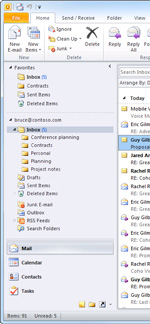 When you click a folder in the Navigation Pane, that folder becomes the active folder and you can work with the items within it. For example, in Mail, click the Inbox folder to see new email messages.
The contents of the Navigation Pane are view-specific. For example, in Mail, the Navigation Pane includes the Favorites section in addition to your mail folders.
Tip: For more information about Favorites, see Add or remove folders in Favorites.
The bottom of the Navigation Pane contains the view buttons that enable you to switch between Mail, Calendar, Contacts, Tasks, Notes, Folder List, and Shortcuts.
To quickly see more or fewer buttons or folders, point to the horizontal splitter bar between the folders and the buttons, and drag the bar up or down when the pointer turns into a double-headed arrow  . If you drag the horizontal splitter bar to the bottom of the Navigation Pane, all the large buttons become small buttons and appear as a single row of icons at the bottom of the Navigation Pane.
Customizing the Navigation Pane
To change the appearance or contents of the Navigation Pane, see the following topics:


COMMENTS