Turn off track changes in Word 2016 for Mac

Turn off track changes in Word 2016 for Mac Removing all of the tracked changes in your document is a two-step process: f...

Turn off track changes in Word 2016 for Mac

Removing all of the tracked changes in your document is a two-step process: first turn off Track Changes, and then accept or reject the changes in your document. After that, you'll have a clean document that's ready for you to share with others.

Turn off track changes

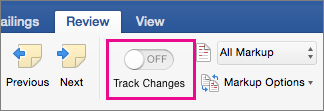
You turn Track Changes off the same way you turn it on:

Click Review > Track Changes.
  Turn off track changes in Word  Turn off track changes in Word 2016 for Mac

Remove tracked changes

Next, permanently remove any markup in your document. The only way to do this is to accept or reject changes and delete comments.

Important:  Tracked changes appear when a document opens. Choosing No Markup helps you see what the final document will look like—but it only hides tracked changes temporarily. The changes aren't deleted, and they'll show up again the next time anyone opens the document. To delete the tracked changes permanently, accept or reject them.

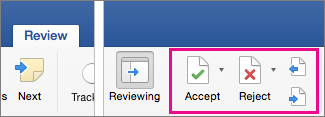
Click Review > Next > Accept or Reject.
  Turn off track changes in Word  Turn off track changes in Word 2016 for Mac

Word keeps or removes the change and then goes to the next one. To accept all the changes at the same time, click the arrow by Accept and click Accept All Changes.

Remove comments

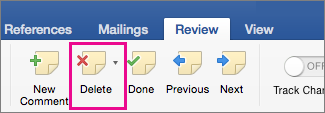
To remove comments from your document, delete them.

Click the comment and then click Review > Delete.
  Turn off track changes in Word  Turn off track changes in Word 2016 for Mac

To remove all comments at once, click a comment and then on the Review tab, click the arrow by Delete, and click Delete All Comments in Document.

  Turn off track changes in Word  Turn off track changes in Word 2016 for Mac
Disclaimer : All images and content that you find here are believed to be in the "public domain". We do not intend to violate legitimate intellectual property, artistic rights or copyright. If you are the legitimate owner of one of the images and content posted on this site, and do not want to be displayed or if you need an appropriate credit, please contact us and we will immediately do whatever is needed by deleting or giving credit to the content displayed.

COMMENTS

Name

Google Aррѕ,1,lainnya,7522,Microsoft Access,1,Microsoft Excel,59,Microsoft Office,13,Microsoft Office 2003,4,Microsoft Office 2007,1,Microsoft Outlook,1,Microsoft Word,71,Mісrоѕоft Office Training,1,Mісrоѕоft Offісе 365,2,Office 2007,3,Power Map,1,PowerPoint,14,Windows Accessibility Options,1,
ltr
item
Microsoft Office Online: Turn off track changes in Word 2016 for Mac
Turn off track changes in Word 2016 for Mac
https://support.content.office.net/en-us/media/77cfbeca-9099-4657-89b3-f3ec265f49a2.png
Microsoft Office Online
https://promisestoread.blogspot.com/2018/03/turn-off-track-changes-in-word-2016-for.html
https://promisestoread.blogspot.com/
https://promisestoread.blogspot.com/2018/03/turn-off-track-changes-in-word-2016-for.html
true
593202333244584315
UTF-8
Loaded All Posts Not found any posts VIEW ALL Readmore Reply Cancel reply Delete By Home PAGES POSTS View All RECOMMENDED FOR YOU LABEL ARCHIVE SEARCH ALL POSTS Not found any post match with your request Back Home Sunday Monday Tuesday Wednesday Thursday Friday Saturday Sun Mon Tue Wed Thu Fri Sat January February March April May June July August September October November December Jan Feb Mar Apr May Jun Jul Aug Sep Oct Nov Dec just now 1 minute ago $$1$$ minutes ago 1 hour ago $$1$$ hours ago Yesterday $$1$$ days ago $$1$$ weeks ago more than 5 weeks ago Followers Follow THIS PREMIUM CONTENT IS LOCKED STEP 1: Share. STEP 2: Click the link you shared to unlock Copy All Code Select All Code All codes were copied to your clipboard Can not copy the codes / texts, please press [CTRL]+[C] (or CMD+C with Mac) to copy