What is Presenter view? This article provides an overview of Presenter view and explains what is required to use it...
What is Presenter view?
This article provides an overview of Presenter view and explains what is required to use it in PowerPoint. To learn how to set up Presenter view, see View your speaker notes privately, while delivering a presentation on multiple monitors. To learn how to use Presenter view while presenting in PowerPoint 2016 or PowerPoint 2013, see Start the presentation and see your notes in Presenter view.
Ensure that the computer you are using for your presentation supports the use of multiple monitors. Most modern desktop computers have multiple monitor support built in; if not, you'll need two video cards.
Overview of Presenter view
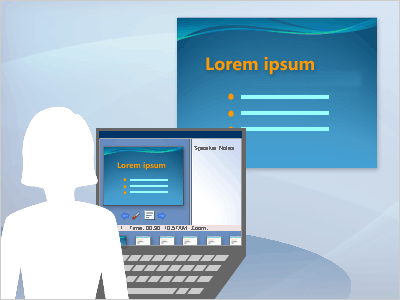
Presenter view is a great way for you to view your presentation with your speaker notes on one computer (your laptop, for example), while the audience views the notes-free presentation on a different monitor.
Note: PowerPoint only supports the use of two monitors for a presentation. However, you can configure to run a presentation on three or more monitors that are connected to one computer. Check your computer manufacturer's website for up-to-date information about multiple monitor support for your computer.
Presenter view offers the following tools to make it easier for you to present information:
-
You can use thumbnails to select slides out of sequence and create a customized presentation for your audience.
-
Speaker's notes are shown in large, clear type so that you can use them as a script for your presentation.
-
You can darken or lighten the screen during your presentation and then resume where you left off. For example, you might not want to display the slide content during a break or a question and answer (Q and A) period.
In Presenter view, icons and buttons are large enough to navigate easily, even when you are using an unfamiliar keyboard or mouse. The following illustration shows the various tools that are available to you from Presenter view.
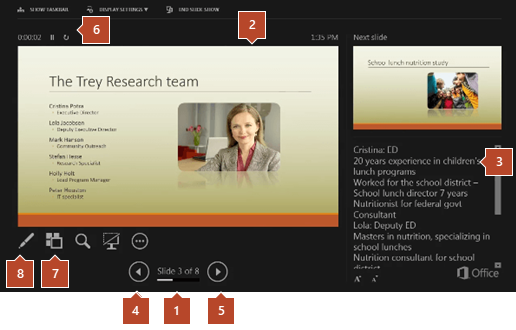
1. The slide number (for example, slide 1 of an 8-slide presentation)
2. The slide you are currently showing to the audience
3. The speaker's notes, which you can use as a script for your presentation
4. Click to go to the previous slide
5. Click to go to the next slide
6. The elapsed time of your presentation, in hours and minutes
7. Click to view thumbnails of all slides in your presentation
8. The pen, laser pointer, or highlighter tool
Presenter view is a great way for you to view your presentation with your speaker notes on one computer (your laptop, for example), while the audience views the notes-free presentation on a different monitor.
Note: PowerPoint only supports the use of two monitors for a presentation. However, you can configure to run a presentation on three or more monitors that are connected to one computer. Check your computer manufacturer's website for up-to-date information about multiple monitor support for your computer.
Presenter view offers the following tools to make it easier for you to present information:
-
You can use thumbnails to select slides out of sequence and create a customized presentation for your audience.
-
Speaker's notes are shown in large, clear type so that you can use them as a script for your presentation.
-
You can darken or lighten the screen during your presentation and then resume where you left off. For example, you might not want to display the slide content during a break or a question and answer (Q and A) period.
In Presenter view, icons and buttons are large enough to navigate easily, even when you are using an unfamiliar keyboard or mouse. The following illustration shows the various tools that are available to you from Presenter view.
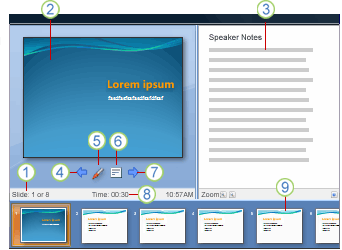
1. The slide number (for example, slide 1 of an 8-slide presentation)
2. The slide you are currently showing to the audience
3. The speaker's notes, which you can use as a script for your presentation
4. Click to go to the previous slide
5. The pen or highlighter
6. Click to display a menu that enables you to end the show, darken or lighten the audience screen, or go to a specific slide number
7. Click to go to the next slide
8. The elapsed time of your presentation, in hours and minutes
9. Slide thumbnails that you can click to skip a slide or to return to a slide that you already presented
See also
View your speaker notes privately, while delivering a presentation on multiple monitors


COMMENTS