Symbols used in drawing object manipulation

Symbols used in drawing object manipulation Special symbols are used to indicate the state of a drawing object and how it...

Symbols used in drawing object manipulation

Special symbols are used to indicate the state of a drawing object and how it can be manipulated. Not all drawing objects can be manipulated or changed in the same way, so not all drawing objects use every symbol.

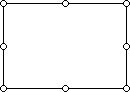
Sizing handles

These appear on a drawing object when it is selected. When you drag these handles, the size of the object is reduced or enlarged.
  Symbols used in drawing object manipulation   Symbols used in drawing object manipulation

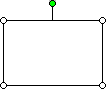
Rotate handle

A green rotate handle appears when you select an object. You can then rotate the object by dragging the handle.
  Symbols used in drawing object manipulation   Symbols used in drawing object manipulation

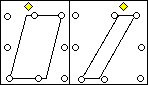
Adjustment handles

A yellow adjustment handle on AutoShapes that allows shape manipulation. In the illustration, the handle was dragged toward the middle of the shape to make the shape thinner.
  Symbols used in drawing object manipulation   Symbols used in drawing object manipulation

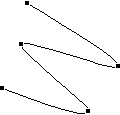
Vertex

These are black squares that appear at the ends and intersections of lines or curves in selected curves and freeform drawing objects when you click Edit Points on the Draw menu. You can drag them to change the shape of the object.
  Symbols used in drawing object manipulation   Symbols used in drawing object manipulation

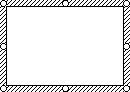
Hatched border

When a text box is surrounded by a hatched border, you can enter, delete, select, and format the text inside.
  Symbols used in drawing object manipulation   Symbols used in drawing object manipulation

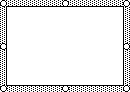
Dotted border

When a text box is surrounded by a dotted border, you can format the text box itself. To get the dotted border, click the hatched border.
  Symbols used in drawing object manipulation   Symbols used in drawing object manipulation

Disclaimer : All images and content that you find here are believed to be in the "public domain". We do not intend to violate legitimate intellectual property, artistic rights or copyright. If you are the legitimate owner of one of the images and content posted on this site, and do not want to be displayed or if you need an appropriate credit, please contact us and we will immediately do whatever is needed by deleting or giving credit to the content displayed.

COMMENTS

Name

Google Aррѕ,1,lainnya,7522,Microsoft Access,1,Microsoft Excel,59,Microsoft Office,13,Microsoft Office 2003,4,Microsoft Office 2007,1,Microsoft Outlook,1,Microsoft Word,71,Mісrоѕоft Office Training,1,Mісrоѕоft Offісе 365,2,Office 2007,3,Power Map,1,PowerPoint,14,Windows Accessibility Options,1,
ltr
item
Microsoft Office Online: Symbols used in drawing object manipulation
Symbols used in drawing object manipulation
https://support.content.office.net/en-us/media/766d272c-5769-4e0d-bbdf-2d0f45b228ce.gif
Microsoft Office Online
https://promisestoread.blogspot.com/2018/10/symbols-used-in-drawing-object.html
https://promisestoread.blogspot.com/
https://promisestoread.blogspot.com/2018/10/symbols-used-in-drawing-object.html
true
593202333244584315
UTF-8
Loaded All Posts Not found any posts VIEW ALL Readmore Reply Cancel reply Delete By Home PAGES POSTS View All RECOMMENDED FOR YOU LABEL ARCHIVE SEARCH ALL POSTS Not found any post match with your request Back Home Sunday Monday Tuesday Wednesday Thursday Friday Saturday Sun Mon Tue Wed Thu Fri Sat January February March April May June July August September October November December Jan Feb Mar Apr May Jun Jul Aug Sep Oct Nov Dec just now 1 minute ago $$1$$ minutes ago 1 hour ago $$1$$ hours ago Yesterday $$1$$ days ago $$1$$ weeks ago more than 5 weeks ago Followers Follow THIS PREMIUM CONTENT IS LOCKED STEP 1: Share. STEP 2: Click the link you shared to unlock Copy All Code Select All Code All codes were copied to your clipboard Can not copy the codes / texts, please press [CTRL]+[C] (or CMD+C with Mac) to copy